✨ Get more on OKRs with code cathyhulu@gmail.com
✨ Get more on OKRs with code cathyhulu@gmail.com
✨ Get more on OKRs with code cathyhulu@gmail.com

Reducing Ticket Resolution Time
In a massive app, like Pokemon Go, there will be many players submitting tickets to troubleshoot their problems, from purchases not redeeming to forgetting login information. Behind the scenes, there is a team of customer service support that communicates with the players and engineers that build the CRM tools for the CS team.
During my tenure on the CS team, I uncovered key UX problems in the current CRM tooling, potentially costing the company millions of revenue. In this project, I discovered, interviewed, mapped, and offered solutions to these problems.
In working towards this goal, I collaborated with customer support managers and web engineers.
Role
UX/UI Designer
Team Size
6 people
Timeframe
4 months
Reducing Ticket Resolution Time
In a massive app, like Pokemon Go, there will be many players submitting tickets to troubleshoot their problems, from purchases not redeeming to forgetting login information. Behind the scenes, there is a team of customer service support that communicates with the players and engineers that build the CRM tools for the CS team.
During my tenure on the CS team, I uncovered key UX problems in the current CRM tooling, potentially costing the company millions of revenue. In this project, I discovered, interviewed, mapped, and offered solutions to these problems.
In working towards this goal, I collaborated with customer support managers and web engineers.
Role
UX/UI Designer
Team Size
6 people
Timeframe
4 months
Context
A CRM Tool to Resolve Pokemon Go Tickets
Many Pokemon Go players submit customer support tickets to resolve issues they experienced in their game or account. The customer service team uses an internal CRM tool to help lookup a player's account info.
For example, a player submits a ticket claiming their purchase wasn't redeemed. Then a customer service representative uses the CRM tool to look at the player's account, verifying that the player did make a purchase. If purchase was found, the representative can grant the player the in-game item.
The customer service team uses an internal CRM tool to lookup players.
Context
A CRM Tool to Resolve Pokemon Go Tickets
Many Pokemon Go players submit customer support tickets to resolve issues they experienced in their game or account. The customer service team uses an internal CRM tool to help lookup a player's account info.
For example, a player submits a ticket claiming their purchase wasn't redeemed. Then a customer service representative uses the CRM tool to look at the player's account, verifying that the player did make a purchase. If purchase was found, the representative can grant the player the in-game item.
The customer service team uses an internal CRM tool to lookup players.
Context
A CRM Tool to Resolve Pokemon Go Tickets
Many Pokemon Go players submit customer support tickets to resolve issues they experienced in their game or account. The customer service team uses an internal CRM tool to help lookup a player's account info.
For example, a player submits a ticket claiming their purchase wasn't redeemed. Then a customer service representative uses the CRM tool to look at the player's account, verifying that the player did make a purchase. If purchase was found, the representative can grant the player the in-game item.
The customer service team uses an internal CRM tool to lookup players.
Context
With the Current Design, Ticket Resolution Takes Hours
From reports, players are frustrated with how long it takes to resolve tickets. It seems the current design is preventing the CS team from resolving tickets faster. To prevent further loss in revenue, I decided to investigate and begin interviewing the CS team.
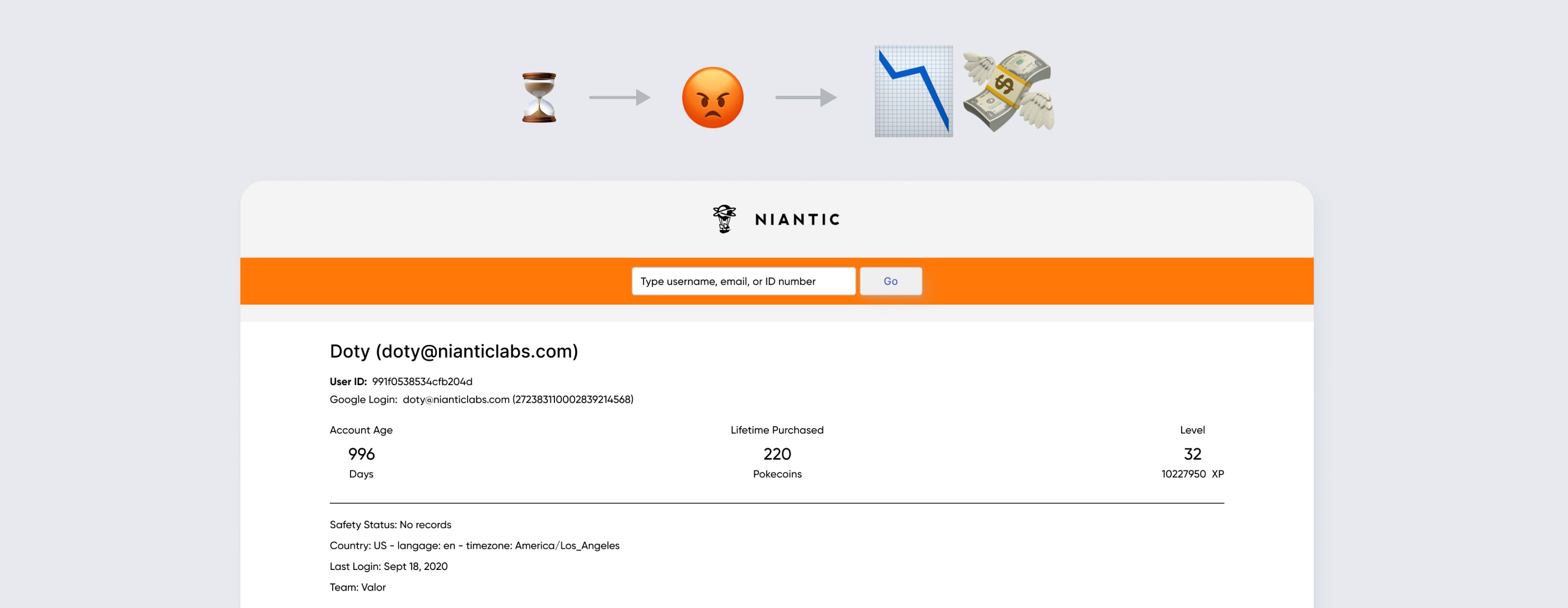
Long Ticket Resolution → Frustrated Users → Reduced Retention → Less Revenue
Context
With the Current Design, Ticket Resolution Takes Hours
From reports, players are frustrated with how long it takes to resolve tickets. It seems the current design is preventing the CS team from resolving tickets faster. To prevent further loss in revenue, I decided to investigate and begin interviewing the CS team.
Long Ticket Resolution → Frustrated Users → Reduced Retention → Less Revenue
Context
With the Current Design, Ticket Resolution Takes Hours
From reports, players are frustrated with how long it takes to resolve tickets. It seems the current design is preventing the CS team from resolving tickets faster. To prevent further loss in revenue, I decided to investigate and begin interviewing the CS team.
Long Ticket Resolution → Frustrated Users → Reduced Retention → Less Revenue
Process
Interviewing Customer Service Reps
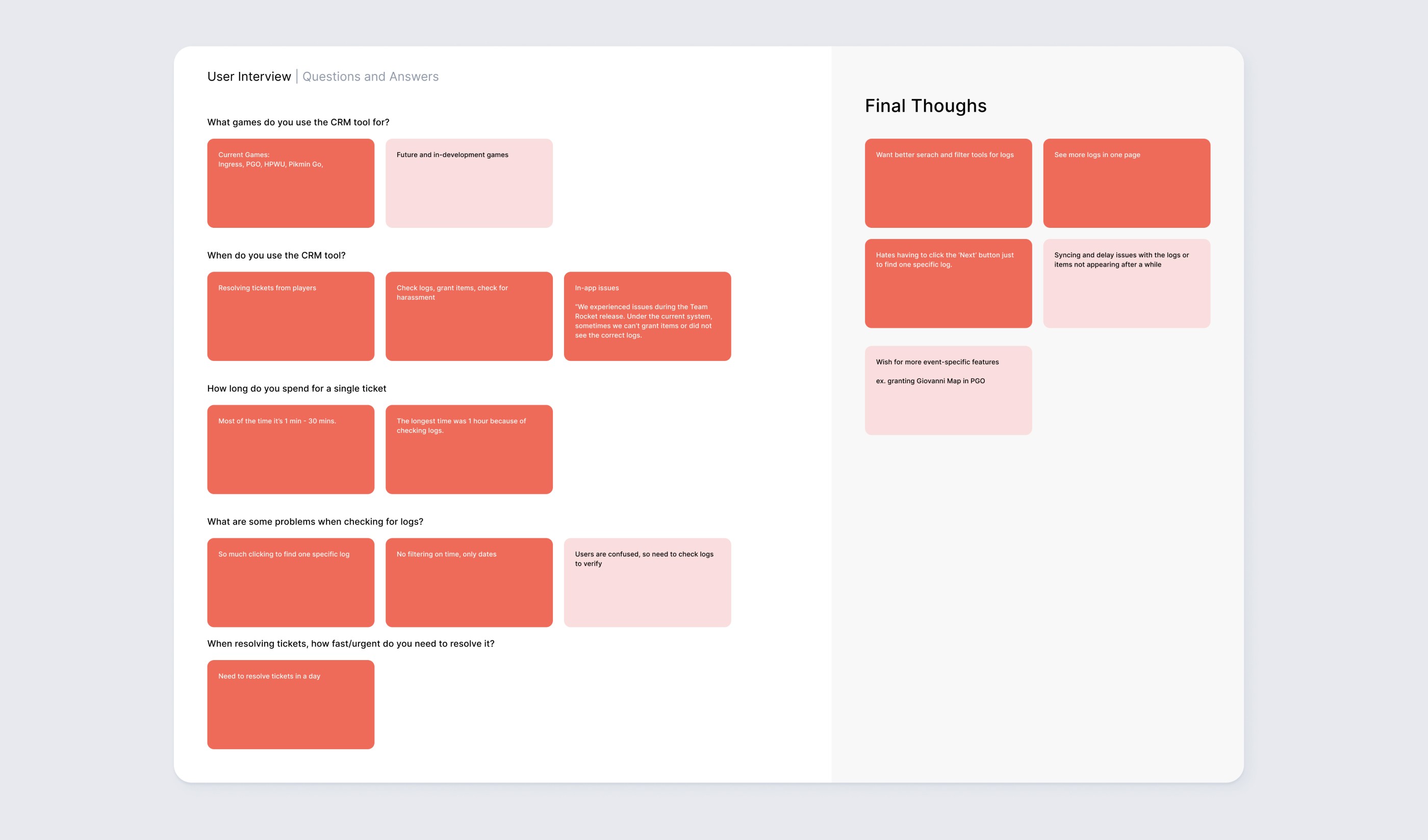
I scheduled and interviewed 5 customer service managers to learn how their team uses the tool. I asked about day-to-day processes, pain points, ticket requests, and alternative tools used, as well as requesting demonstrations of them using the tool.
"This is the first time someone asked about our opinions."
Process
Interviewing Customer Service Reps
I scheduled and interviewed 5 customer service managers to learn how their team uses the tool. I asked about day-to-day processes, pain points, ticket requests, and alternative tools used, as well as requesting demonstrations of them using the tool.
"This is the first time someone asked about our opinions."
Process
Interviewing Customer Service Reps
I scheduled and interviewed 5 customer service managers to learn how their team uses the tool. I asked about day-to-day processes, pain points, ticket requests, and alternative tools used, as well as requesting demonstrations of them using the tool.
"This is the first time someone asked about our opinions."
Process
The Findings: The UX is Terrible for Reading Logs
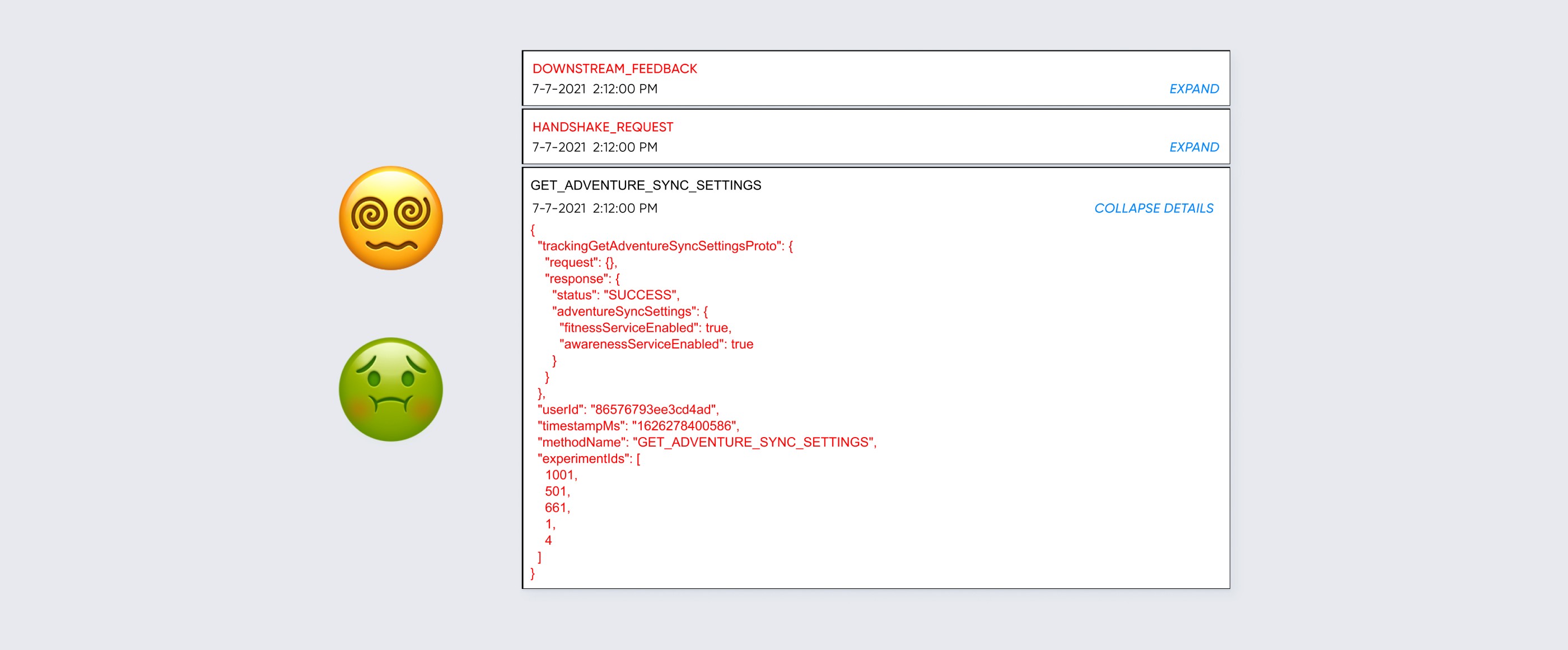
From the interviews, contractors spend the majority of their time reading logs. For instance, if a user claims their purchase didn't go through, the contractor will read through the logs to verify if a purchase transaction did happen as the user claimed. If true, then the contractor will grant the item to the user.
Despite the majority of tickets required reading logs, the tool is terrible for reading. There's no filtering or searching. The pagination has no skip-to-page function, just next or back buttons. Worse, the pagination only displays 5 logs per page! Even the data displayed on log is too vague, unhelpful, or not logged at all.
"The logs can be hard to read and vague."
Process
The Findings: The UX is Terrible for Reading Logs
From the interviews, contractors spend the majority of their time reading logs. For instance, if a user claims their purchase didn't go through, the contractor will read through the logs to verify if a purchase transaction did happen as the user claimed. If true, then the contractor will grant the item to the user.
Despite the majority of tickets required reading logs, the tool is terrible for reading. There's no filtering or searching. The pagination has no skip-to-page function, just next or back buttons. Worse, the pagination only displays 5 logs per page! Even the data displayed on log is too vague, unhelpful, or not logged at all.
"The logs can be hard to read and vague."
Process
The Findings: The UX is Terrible for Reading Logs
From the interviews, contractors spend the majority of their time reading logs. For instance, if a user claims their purchase didn't go through, the contractor will read through the logs to verify if a purchase transaction did happen as the user claimed. If true, then the contractor will grant the item to the user.
Despite the majority of tickets required reading logs, the tool is terrible for reading. There's no filtering or searching. The pagination has no skip-to-page function, just next or back buttons. Worse, the pagination only displays 5 logs per page! Even the data displayed on log is too vague, unhelpful, or not logged at all.
"The logs can be hard to read and vague."
Process
One Ticket Can Take 1+ Hours of Reading
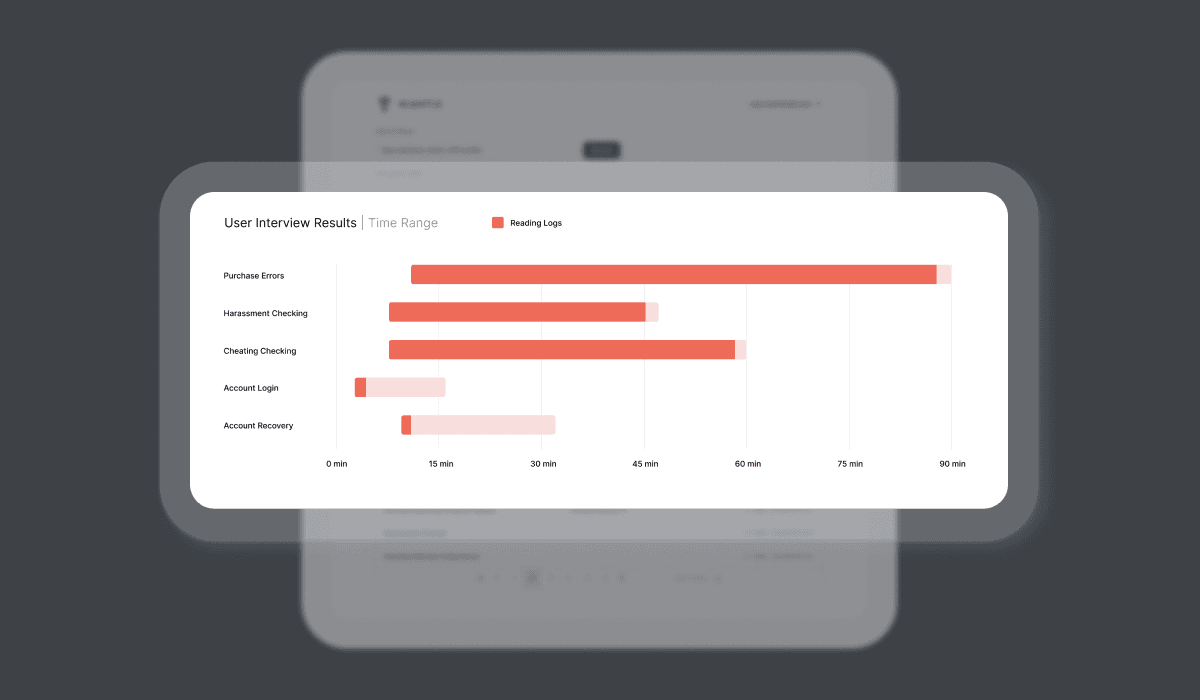
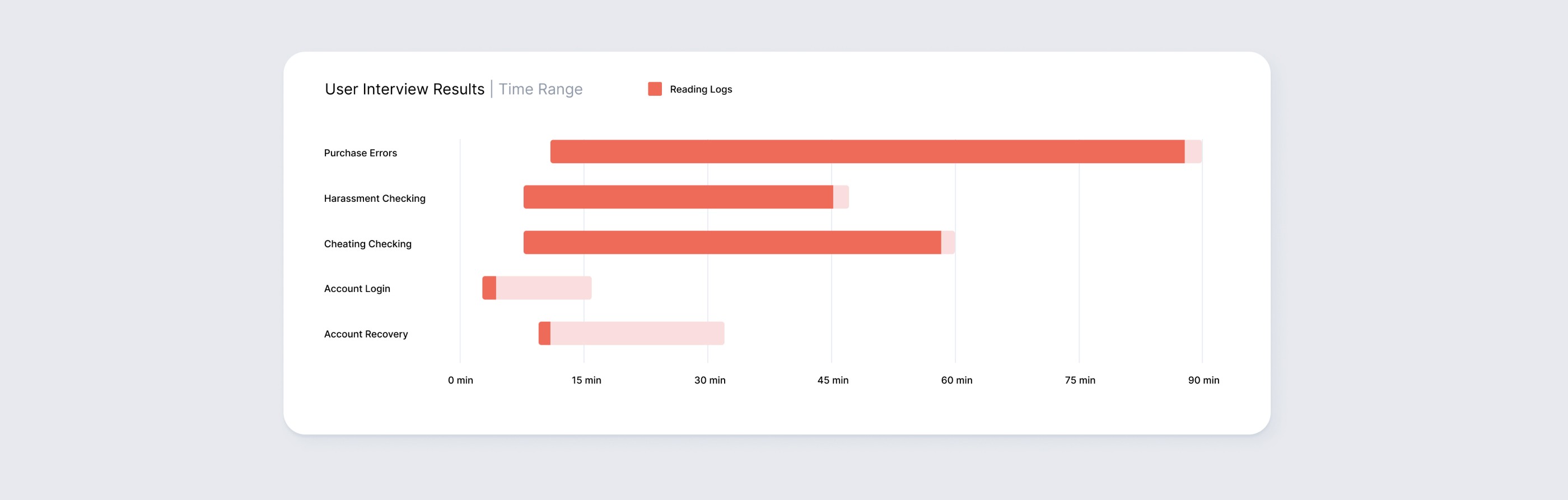
Average time for one single ticket can be 1-30 min. But sometimes it can take an hour due to searching and reading through so many logs. Combined with the terrible UX, this long ticket resolution leads to frustrated users, which leads to lower engagement and retention rates.
Reading logs fast is a big deal.
Process
One Ticket Can Take 1+ Hours of Reading
Average time for one single ticket can be 1-30 min. But sometimes it can take an hour due to searching and reading through so many logs. Combined with the terrible UX, this long ticket resolution leads to frustrated users, which leads to lower engagement and retention rates.
Reading logs fast is a big deal.
Process
One Ticket Can Take 1+ Hours of Reading
Average time for one single ticket can be 1-30 min. But sometimes it can take an hour due to searching and reading through so many logs. Combined with the terrible UX, this long ticket resolution leads to frustrated users, which leads to lower engagement and retention rates.
Reading logs fast is a big deal.
Process
Mapping the Journey
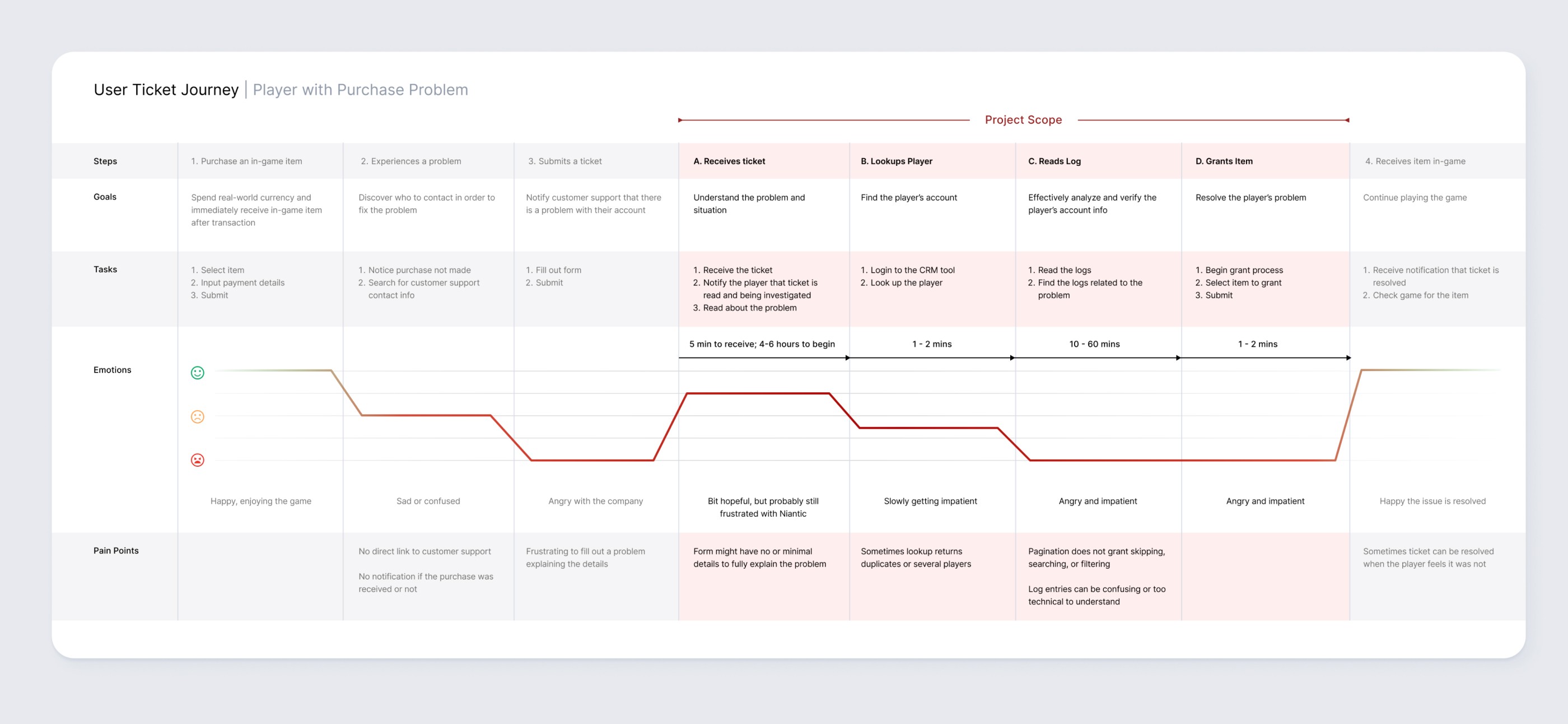
After the interview, I created a user journey to the map end-to-end experience from ticket creation to ticket resolution.
From the user interviews, I mapped our their user journey from ticket creation to resolution.
Process
Mapping the Journey
After the interview, I created a user journey to the map end-to-end experience from ticket creation to ticket resolution.
From the user interviews, I mapped our their user journey from ticket creation to resolution.
Process
Mapping the Journey
After the interview, I created a user journey to the map end-to-end experience from ticket creation to ticket resolution.
From the user interviews, I mapped our their user journey from ticket creation to resolution.
Process
Iterating With the Users
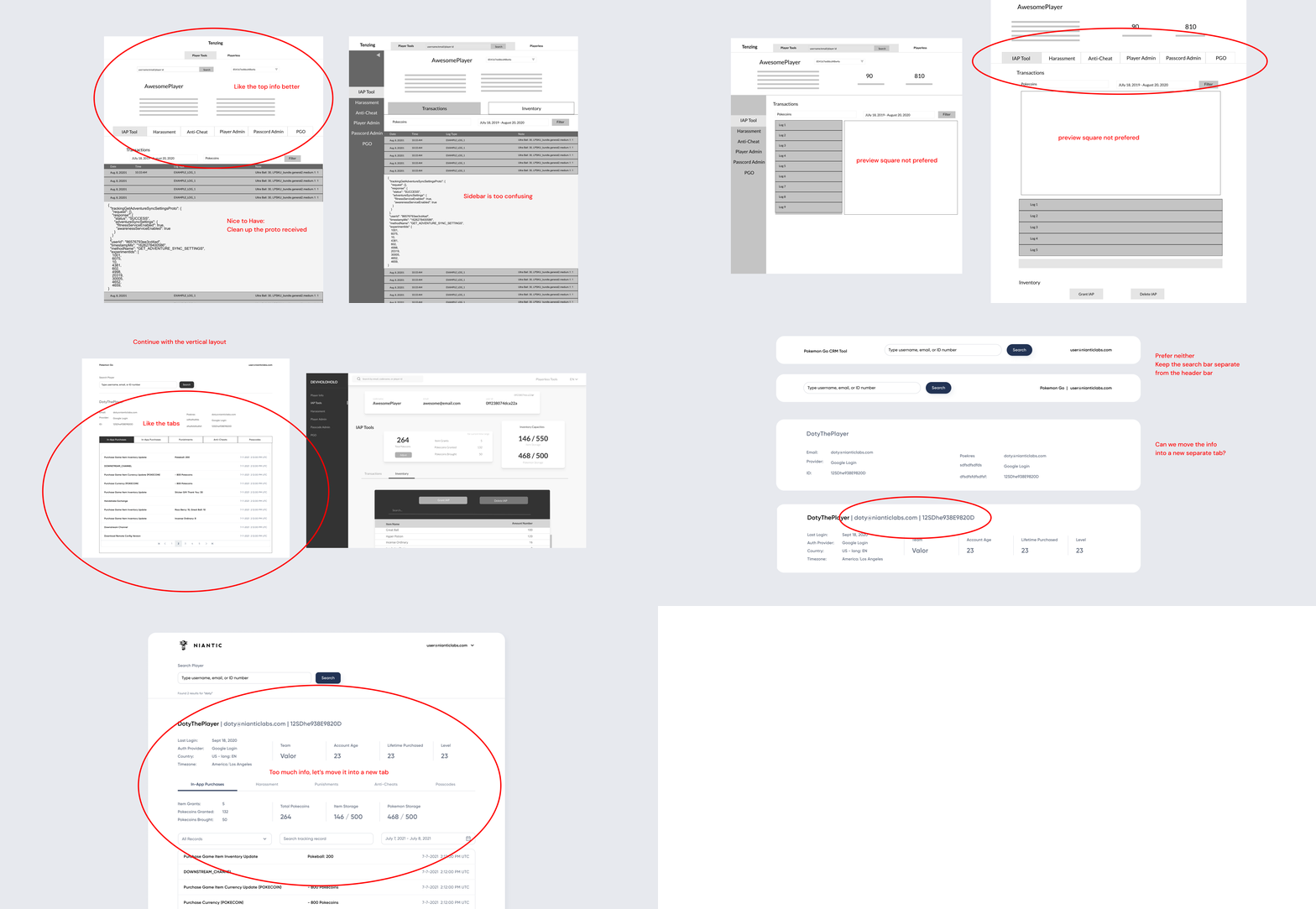
From the low-fi to the high-fi stage, I iterated and asked the users for their feedback. Through this method, I can be confident that my design is the best one to serve their needs and problems.
At each stage, I asked users for their feedback ensuring the final product is the best design.
Process
Iterating With the Users
From the low-fi to the high-fi stage, I iterated and asked the users for their feedback. Through this method, I can be confident that my design is the best one to serve their needs and problems.
At each stage, I asked users for their feedback ensuring the final product is the best design.
Process
Iterating With the Users
From the low-fi to the high-fi stage, I iterated and asked the users for their feedback. Through this method, I can be confident that my design is the best one to serve their needs and problems.
At each stage, I asked users for their feedback ensuring the final product is the best design.
Design Decision
More Pagination Controls for Better Searching and Skipping
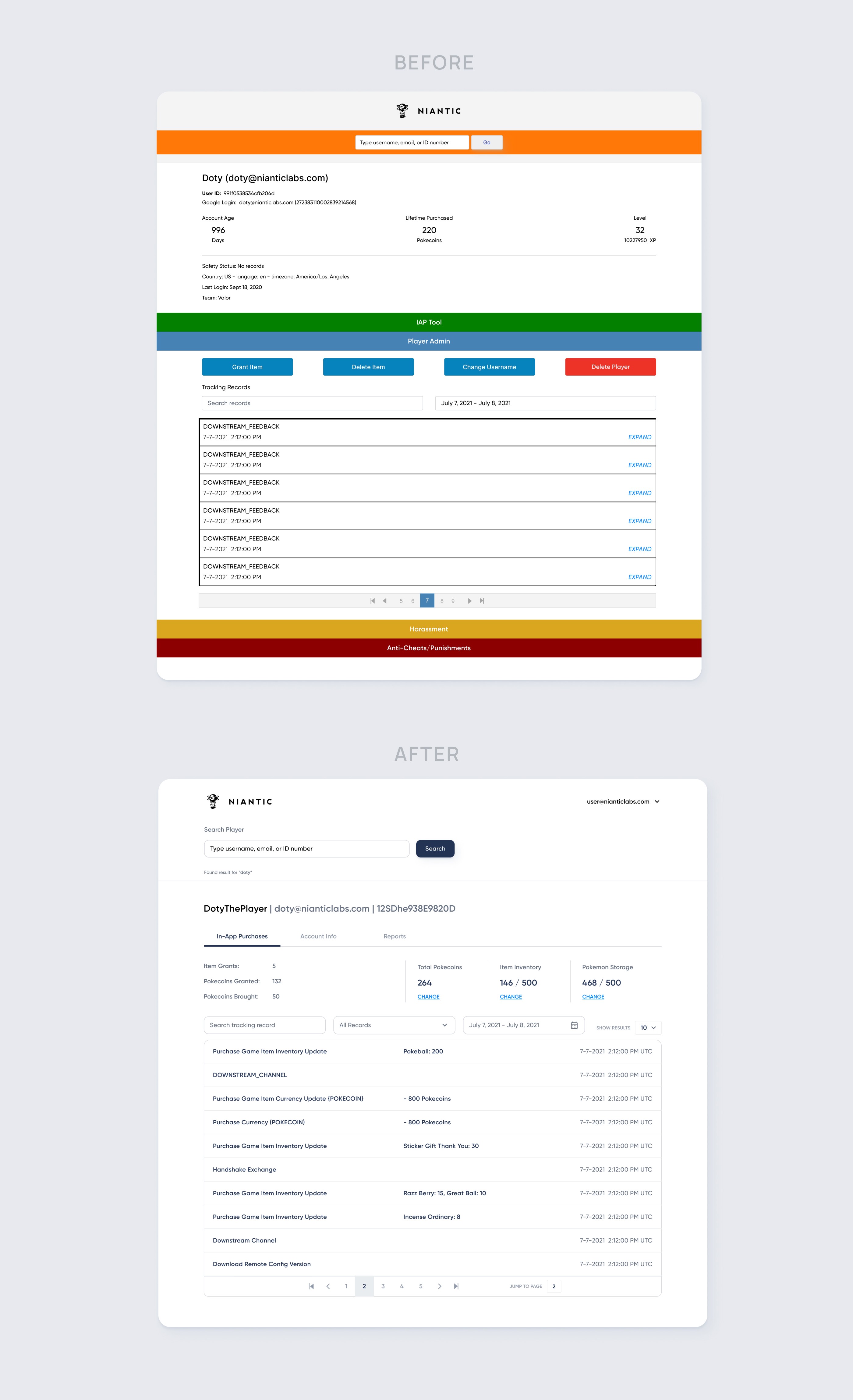
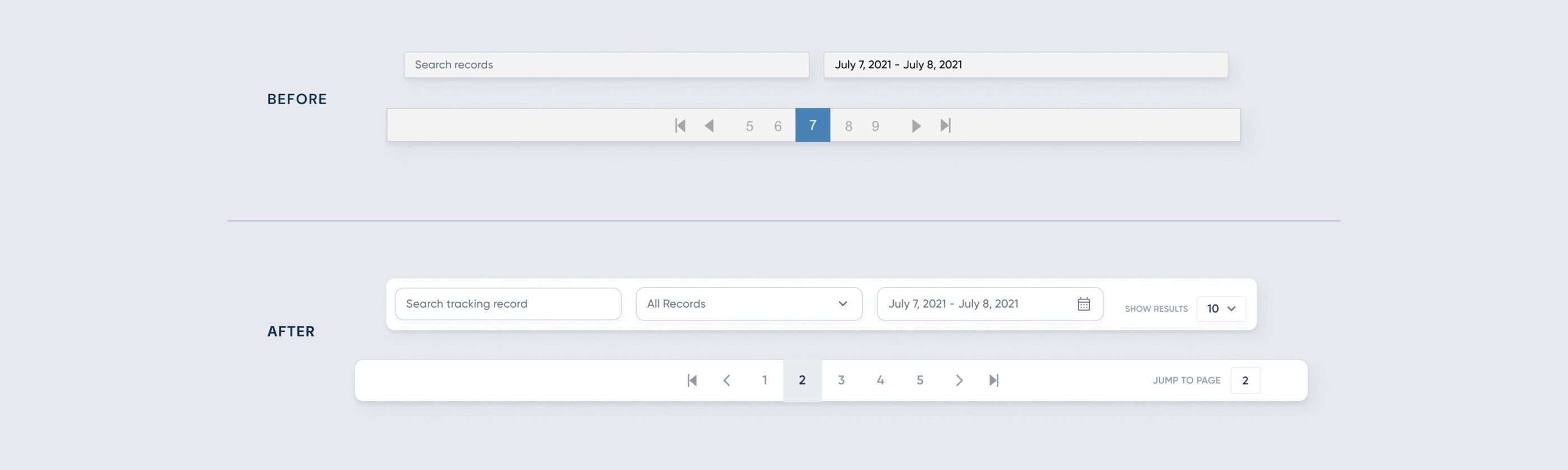
In the old design, skipping controls were limited. A user could only skip between the 5 nearest pages and the first/last page. From interviews, these limitations severely slowed down the CS team.
In the new design, I created more skipping and searching options. Now a user can search, filter, and jump to pages on the pagination. Thereby, enabling more power to the CS team and faster ticket resolution.
In the new design, I created more search, filter, and jump controls in order to help resolve tickets faster.
Design Decision
More Pagination Controls for Better Searching and Skipping
In the old design, skipping controls were limited. A user could only skip between the 5 nearest pages and the first/last page. From interviews, these limitations severely slowed down the CS team.
In the new design, I created more skipping and searching options. Now a user can search, filter, and jump to pages on the pagination. Thereby, enabling more power to the CS team and faster ticket resolution.
In the new design, I created more search, filter, and jump controls in order to help resolve tickets faster.
Design Decision
More Pagination Controls for Better Searching and Skipping
In the old design, skipping controls were limited. A user could only skip between the 5 nearest pages and the first/last page. From interviews, these limitations severely slowed down the CS team.
In the new design, I created more skipping and searching options. Now a user can search, filter, and jump to pages on the pagination. Thereby, enabling more power to the CS team and faster ticket resolution.
In the new design, I created more search, filter, and jump controls in order to help resolve tickets faster.
Design Decision
Displaying Important Information First
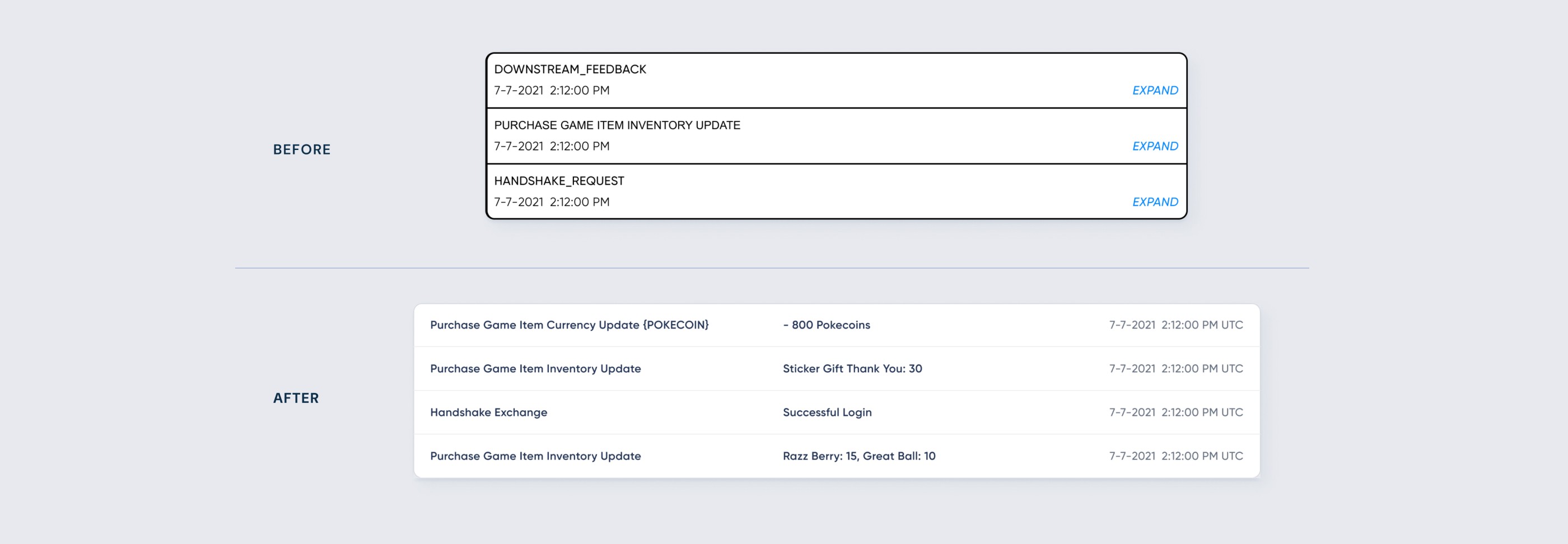
In the old design, the information inside the table item was vague and unhelpful. Often, a user had to click the item to display more detailed and clear info. The lack of useful info prevents the CS from skimming and quickly reading through logs, thereby extending the ticket resolution time.
In the new design, I made sure the most important info was displayed, with clear wording on what it is. Thus, allowing the CS team to skim and read through the many logs, cutting down on the ticket resolution time.
The new design allows for quick and fast reading, thus reducing the ticket resolution time.
Design Decision
Displaying Important Information First
In the old design, the information inside the table item was vague and unhelpful. Often, a user had to click the item to display more detailed and clear info. The lack of useful info prevents the CS from skimming and quickly reading through logs, thereby extending the ticket resolution time.
In the new design, I made sure the most important info was displayed, with clear wording on what it is. Thus, allowing the CS team to skim and read through the many logs, cutting down on the ticket resolution time.
The new design allows for quick and fast reading, thus reducing the ticket resolution time.
Design Decision
Displaying Important Information First
In the old design, the information inside the table item was vague and unhelpful. Often, a user had to click the item to display more detailed and clear info. The lack of useful info prevents the CS from skimming and quickly reading through logs, thereby extending the ticket resolution time.
In the new design, I made sure the most important info was displayed, with clear wording on what it is. Thus, allowing the CS team to skim and read through the many logs, cutting down on the ticket resolution time.
The new design allows for quick and fast reading, thus reducing the ticket resolution time.
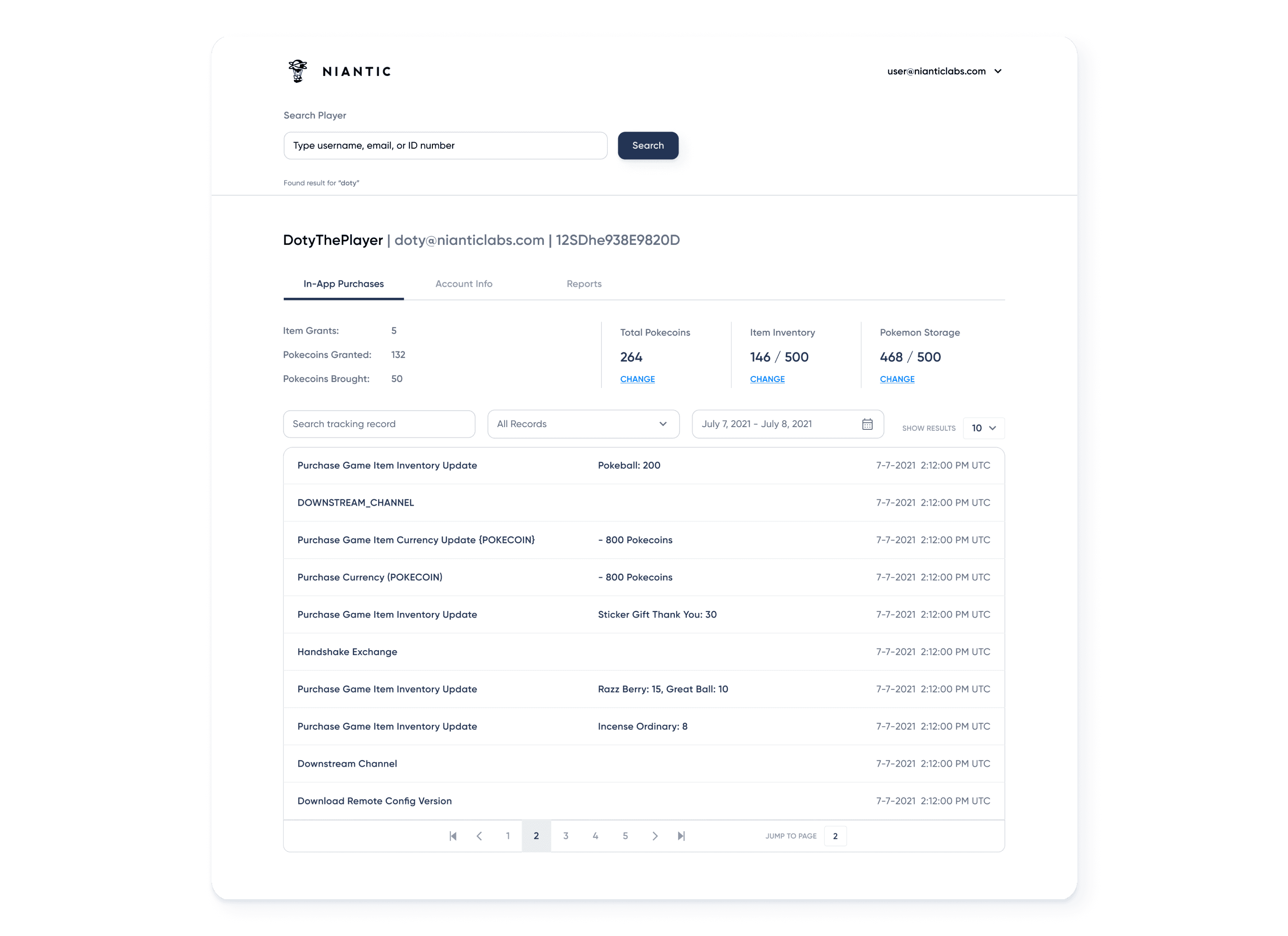
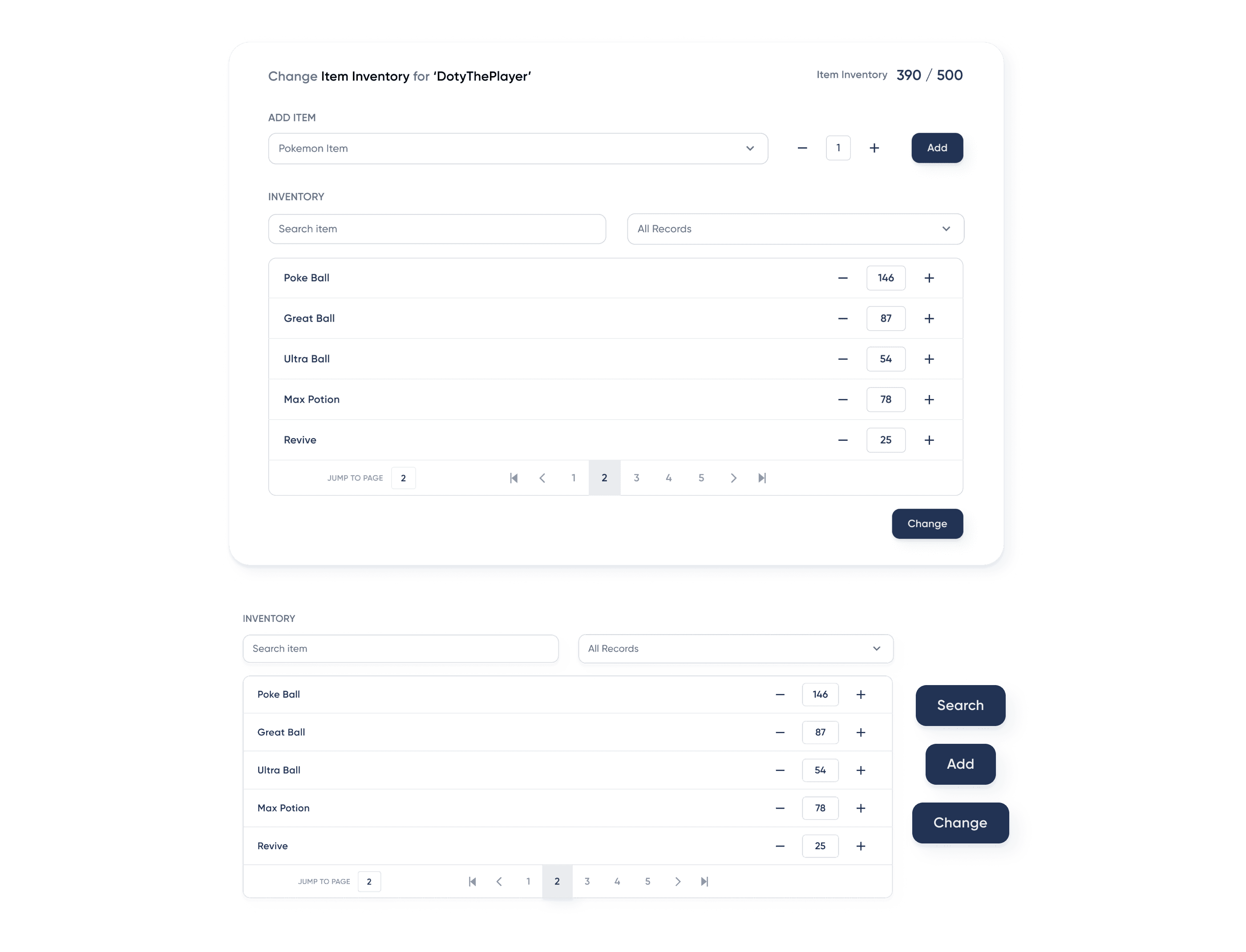
Putting It Together
Impact
Reduced Ticket Resolution Time
By empowering the CS team to search and filter logs, as well as optimizing the UI for fast skimming, I have successfully cut 20 mins from the original 60 mins time. AS a result, resolution times now ranges from 1 minute to 40 minutes. This faster time has led a noticeably increased customer satisfaction among players.
Impact
Reduced Ticket Resolution Time
By empowering the CS team to search and filter logs, as well as optimizing the UI for fast skimming, I have successfully cut 20 mins from the original 60 mins time. AS a result, resolution times now ranges from 1 minute to 40 minutes. This faster time has led a noticeably increased customer satisfaction among players.
Impact
Reduced Ticket Resolution Time
By empowering the CS team to search and filter logs, as well as optimizing the UI for fast skimming, I have successfully cut 20 mins from the original 60 mins time. AS a result, resolution times now ranges from 1 minute to 40 minutes. This faster time has led a noticeably increased customer satisfaction among players.
More Projects

More Projects
More Projects
About
Hello, I'm Catherine. I have experience in both the engineering and design stages of product development. My career journey has been driven by the question: "how to enrich people's lives through technology?" I am motivated by finding new ways to make the world a better place. With my unique background in software engineering, I combine my creative thinking and practical problem-solving to find solutions that is both meaningful and helpful, but also actionable, accessible, and scalable.
If you are looking for an awesome collaborator or have a cool project, feel free to send me a message.
About
Hello, I'm Catherine. I have experience in both the engineering and design stages of product development. My career journey has been driven by the question: "how to enrich people's lives through technology?" I am motivated by finding new ways to make the world a better place. With my unique background in software engineering, I combine my creative thinking and practical problem-solving to find solutions that is both meaningful and helpful, but also actionable, accessible, and scalable.
If you are looking for an awesome collaborator or have a cool project, feel free to send me a message.
About
Hello, I'm Catherine. I have experience in both the engineering and design stages of product development. My career journey has been driven by the question: "how to enrich people's lives through technology?" I am motivated by finding new ways to make the world a better place. With my unique background in software engineering, I combine my creative thinking and practical problem-solving to find solutions that is both meaningful and helpful, but also actionable, accessible, and scalable.
If you are looking for an awesome collaborator or have a cool project, feel free to send me a message.